🌿 Plan your days.
Plan your trips.
Know when to leave.

A calendar tells you when things are. Planthology tells you whether your day actually works; a leave-by time for every leg of it β€” driving, walking, or on transit β€” warnings when plans don't physically fit, errands routed into the fastest loop at the cheapest hour, and your workweek and your trips in one agenda.

⚠️ Travel times and leave-by estimates are best guesses; always double-check routes and times with a maps app before leaving. Full disclaimer

iOS 26.4+ Β· iPhone Β· free of ads and tracking

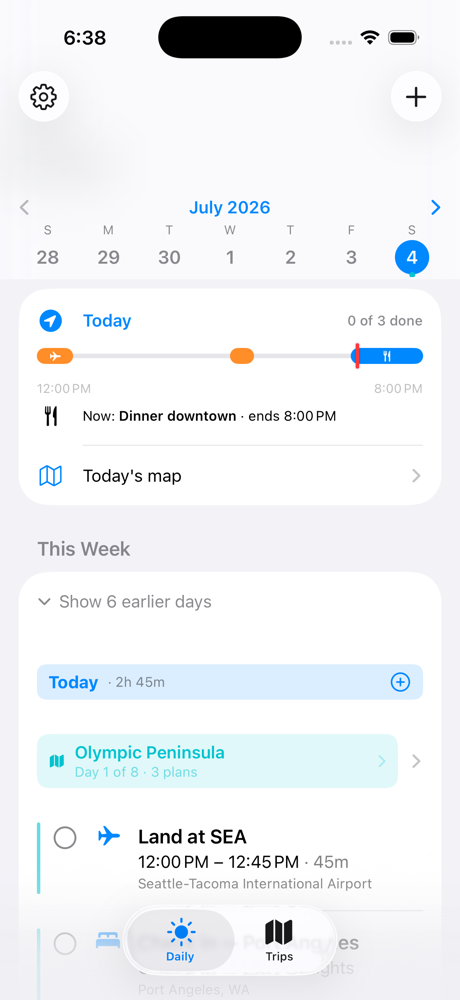
Planthology's Daily view showing a week of plans with a live progress bar

Everything in one agenda

Most planners store your plans. Planthology pressure-tests them; against the map, the clock, and each other.

πŸ•’

Leave-by for the whole day

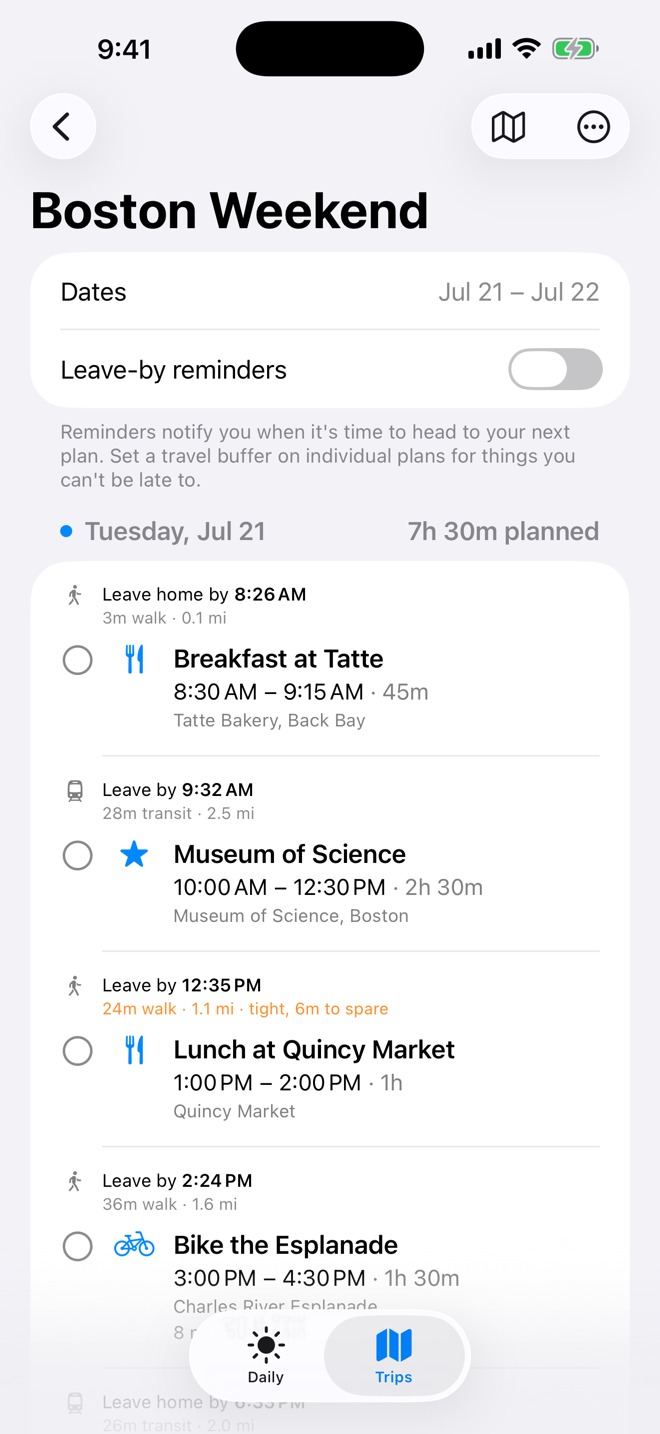
Not one alert for one event; your day as a chain. The first leg starts from home base (or tonight's lodging on a trip), each leg starts where the last one ended, and long gaps route you home in between. "Leave by 11:23 AM Β· 3h 37m drive" sits between every pair of plans, in advance. A notification tells you when to go, with an optional countdown in the Dynamic Island. And day one of a trip knows the truth: that first long drive starts at home, no matter how far it goes.

πŸš†

Drive, walk, or take the train

Every plan knows how you get to it. Tap the icon on any travel leg to switch between driving, walking, and transit; the leave-by time, notifications, and countdown all follow. Transit estimates are door-to-door β€” the walk to the station, the ride, and the walk at the far end β€” so "take the train to work" is one setting, not three plans. Directions open Apple or Google Maps already in the right mode.

🧺

Errands without a schedule

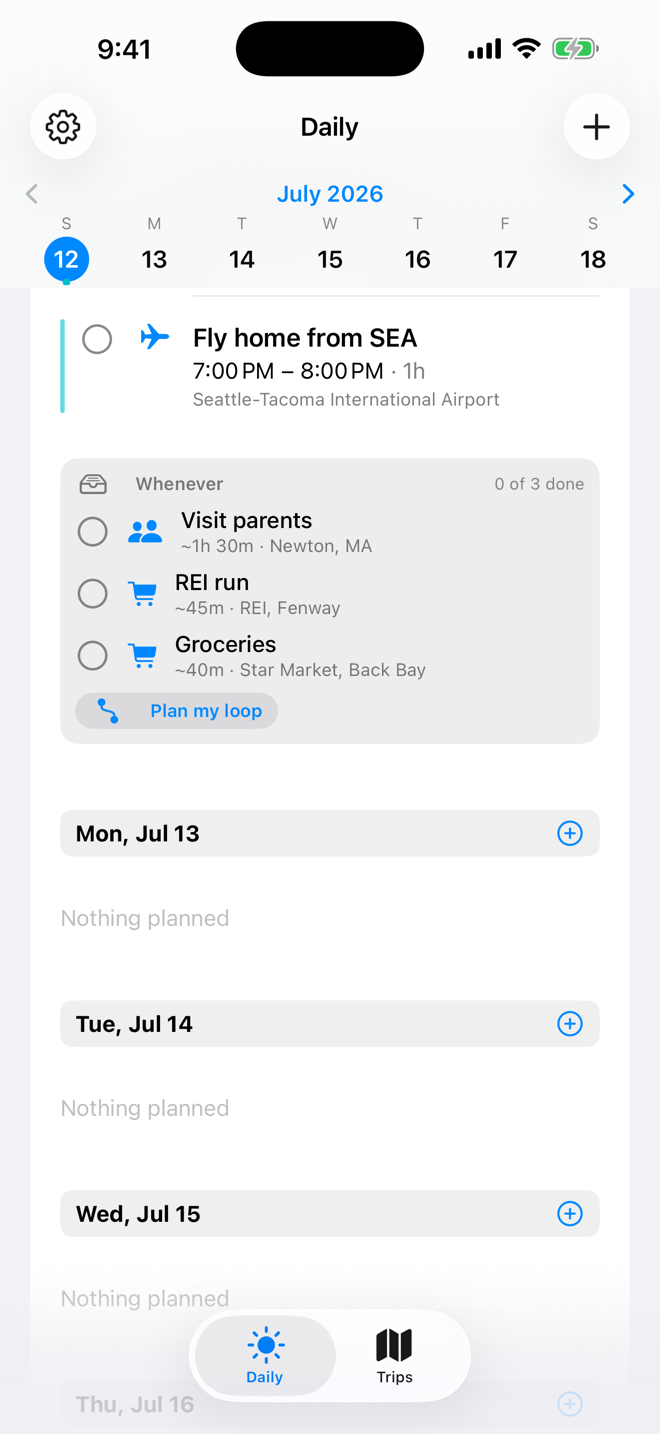
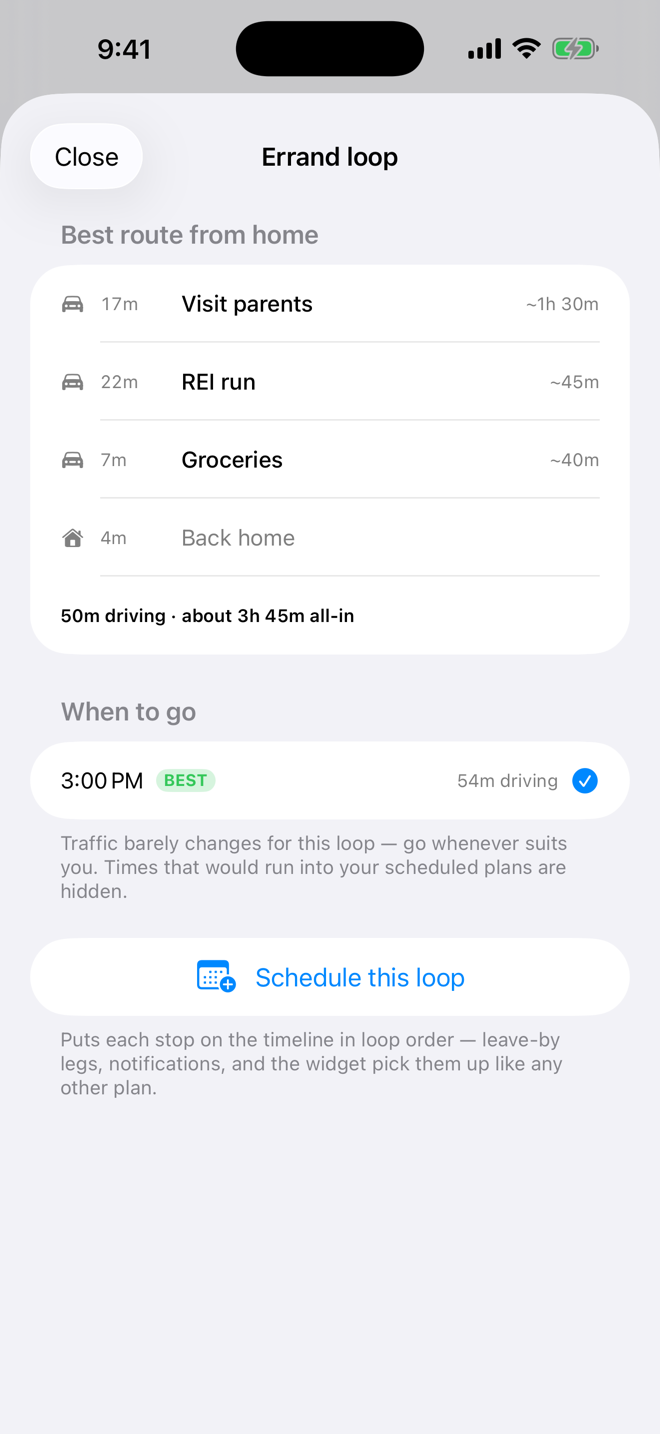
Some days you just need to hit the gym, see your parents, and grab groceries β€” whenever. Mark a plan "Anytime" and it sits on the day's Whenever shelf instead of the timeline. Then let the app earn its keep: it finds the fastest loop through your stops from home, checks traffic across the whole day for the cheapest hour to go β€” skipping times that collide with your real plans β€” and schedules the loop onto your timeline in one tap.

🚦

Days that actually fit

A calendar will happily book dinner across town ten minutes after a hike ends. Planthology knows the drive times, estimates a hike's duration from its mileage and elevation, and flags tight days in orange and impossible ones in red; before you live them.

βœ…

Plans with a pulse

A plan is an event, a task, and a place in one. Your day shows what's done, what's up next and in how long, and plans complete themselves when you arrive. Recurring events, overlap warnings, a live progress bar through today; and reminders for things without an address.

πŸ—ΊοΈ

Trips, day by day

Build itineraries with lodging, flights, hikes, and food. Every day gets a map and drive legs between stops; starting from wherever you're sleeping that night. Import GPX routes or search National Park Service trails to fill in hike stats automatically.

πŸ”

Private sharing

Share a trip view-only or collaborative. It's end-to-end encrypted, with the key riding only in the invite; the server stores ciphertext it can't read. And a shared trip carries lodging, routes, photos, and done-state, not just time blocks.

✨

A past worth keeping

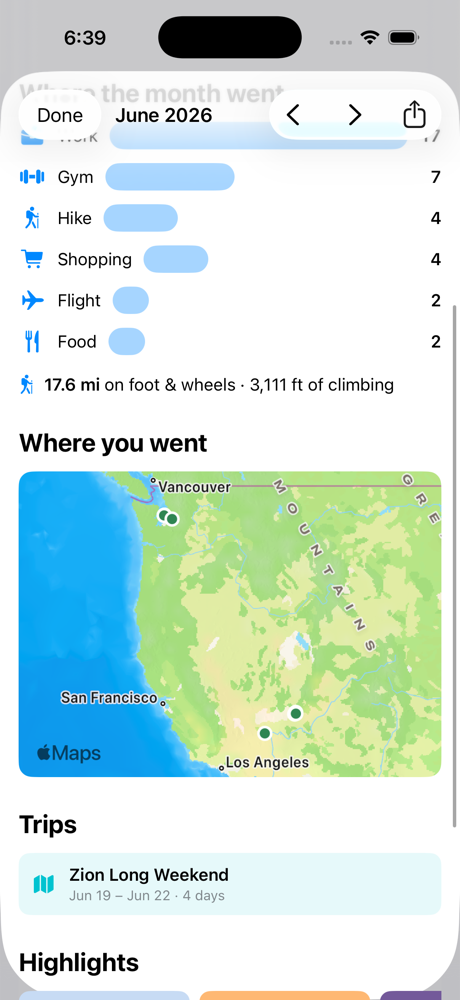
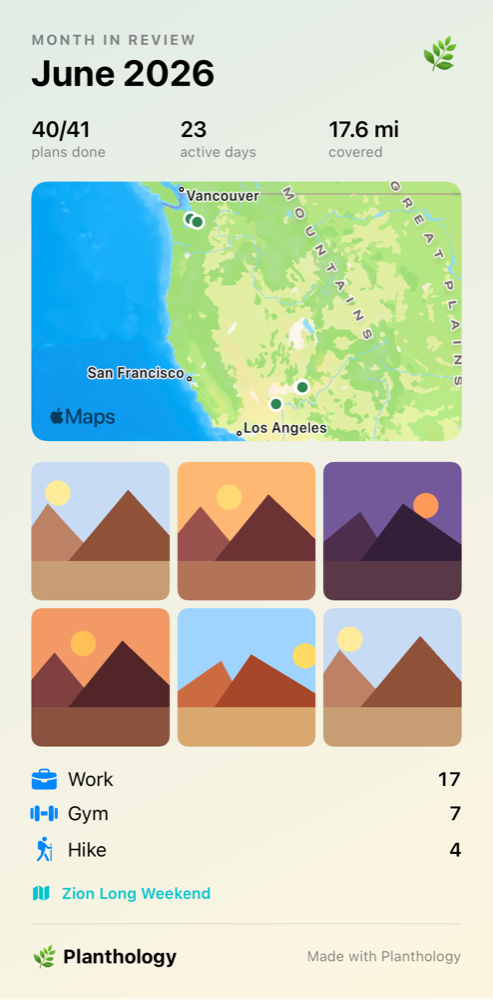
Month in Review and Trip Review turn your plans and photos into stats, a pin map of everywhere you went, and a shareable card sized for Instagram or Messages. A journal you produce just by living your plans.

πŸ“²

Widgets that keep score

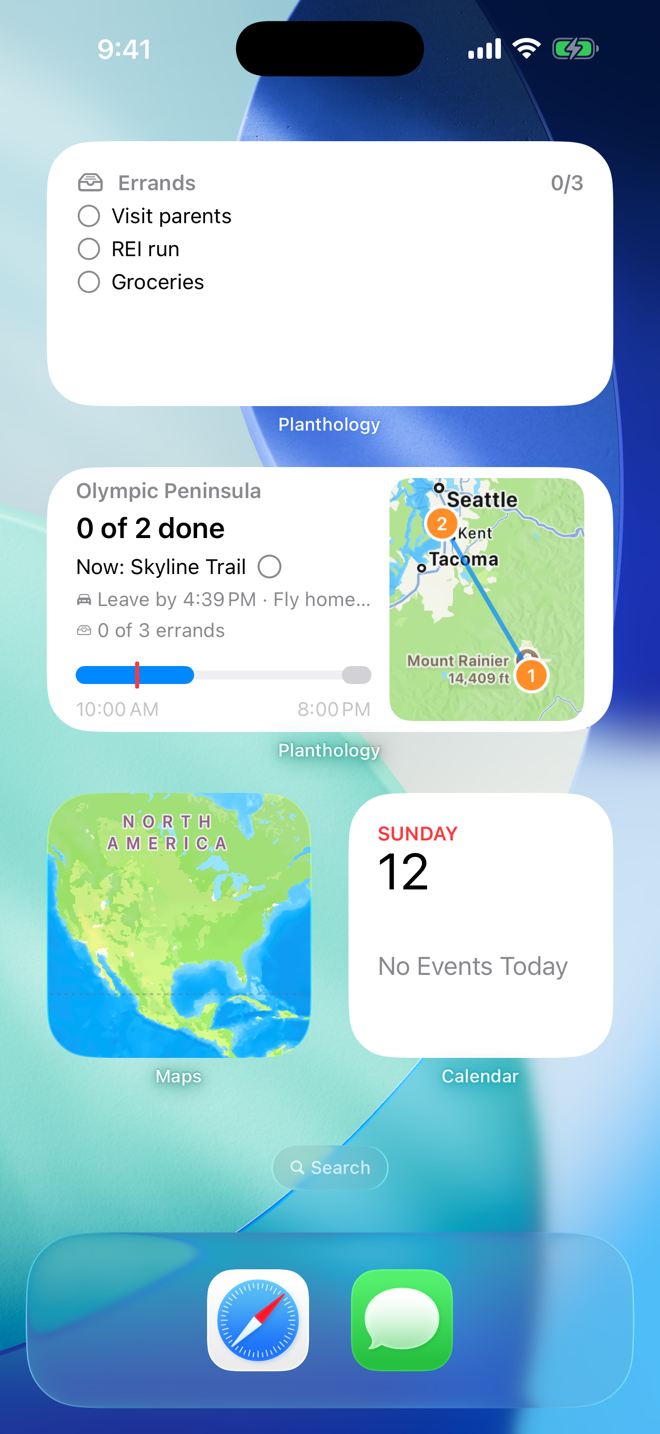
The Today widget puts your progress bar, the next leave-by, and the day's route map on your Home Screen β€” and stays correct past midnight without opening the app. The Errands widget lists the day's whenever-list with tappable circles: check things off right from the Home Screen, and the app syncs up next time you open it.
"Doesn't my calendar already do this?"

Feature by feature, it can sound like it. Side by side, it doesn't. Theirs is an alert; ours is an itinerary.

A calendar Fires one time-to-leave alert per event, on the day, from wherever your phone happens to be; and only if you typed in an address.

Planthology Prints a leave-by time, drive time, and distance between every pair of plans for the entire day β€” in advance.

A calendar Has no opinion. Book dinner across town ten minutes after a hike ends and it says nothing.

Planthology Checks whether the day is physically possible β€” tight slack in orange, impossible in red, total time planned per day.

A calendar Splits your day across two apps that don't talk: events you can't check off, reminders that know nothing about travel.

Planthology One object per plan: event, task, and place; with "up next", auto-complete when you arrive, and a leave-by countdown in the Dynamic Island.

A calendar Has no answer for "sometime today." You either invent a fake time or keep a separate list that knows nothing about traffic.

Planthology A Whenever shelf holds the day's errands, orders them into the fastest loop from home, and names the cheapest hour to run it β€” around the plans you've already made.

A calendar Shares time blocks, and has no idea where you're sleeping.

Planthology Shares whole trips β€” lodging, routes, photos, done-state β€” end-to-end encrypted, so not even the server can read them.

A calendar Leaves the past as a graveyard of gray boxes.

Planthology Turns it into a Month in Review β€” plans done, miles on foot, a map of where you went, your photos.

A calendar tells you when things are. Planthology tells you whether your day actually works; and when to leave for every piece of it.

See it in action

Real screens from the app.

Daily agenda with week strip, live progress bar, and a trip banner
The Daily agenda: today's progress, this week's plans.
Trip day showing walk and transit legs with leave-by times and a tight-slack warning
Walk, transit, or drive β€” every leg gets a leave-by, and tight ones get flagged.
The Whenever shelf holding three unscheduled errands with a Plan my loop button
The Whenever shelf: errands that belong to the day, not a time slot.
Errand loop planner showing the best stop order, total driving, and the best time to go
The loop planner: fastest order, total time, and when to actually go.
Home Screen with the Errands widget and the Today widget showing progress, leave-by, and route map
Widgets: your day and your errands, one glance away.
Month in Review with category breakdown and a map of visited places
Month in Review: where the month went, on a map.
Shareable month recap card with stats, map pins, and photos
The share card: post your month anywhere.
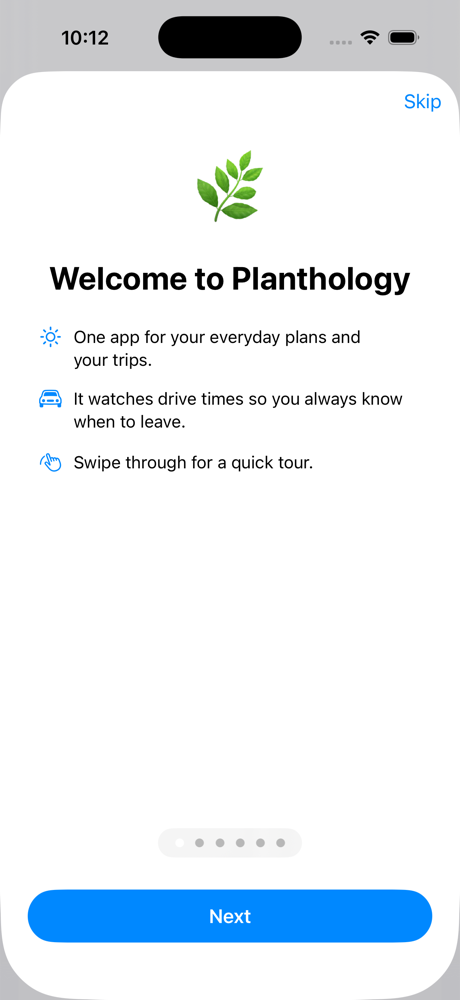
Welcome tour page introducing the errands features
A quick tour greets you on first launch.

Feedback & support

Found a bug? Want a feature? I read everything.

Support page: planthology support & FAQ Β· Privacy: privacy policy Β· Feedback about Snowball Budget has its own links on its page.

Projects

What I'm building. More on the way.

🌿

Planthology This app

An iOS planner that unifies everyday scheduling and trip planning, with drive-time intelligence, encrypted trip sharing, and shareable month recaps.

Learn more ↑

❄️

Snowball Budget

A calm monthly money planner: budget in the style that fits you; zero-based, 50/30/20, kakeibo, or envelopes; log expenses in two taps, grow a savings jar, and snowball your debt to a real debt-free date. No accounts, no servers; everything stays on your device.

Learn more β†’

About the developer

Hi, I'm Mitchell Isler β€” a software engineer who builds apps to solve his own problems first and polishes them until they're worth sharing. Planthology started as a vacation itinerary tool and grew into the planner I use for everything, every day.

I care about software that respects people: local-first data, end-to-end encryption where your information leaves the device, no ads, no tracking.

Want to work together or see more? Find me on GitHub, or open an issue to get in touch.

Toolbox

  • Swift Β· SwiftUI Β· SwiftData
  • MapKit Β· ActivityKit Β· WidgetKit Β· App Intents
  • Supabase Β· end-to-end encryption (CryptoKit)
  • Local notifications Β· Live Activities